Lead tracking in Google Sheets for small teams
By Madhur Tyagi · · 4 min read
In short
A small team can track leads well in one Google Sheet. Use one row per lead and about 9 columns, including source, status, owner and next follow up date. Add dropdowns so everyone types the same words, colour overdue follow ups red, and spend 10 minutes every morning on the red rows.
Why trust this: written by Madhur Tyagi, founder of The Human Algorithm. 8+ years, 25+ brands, since 2017. The replies and checks here come from our daily work on Indian funnels. Example numbers are marked as examples.
Most small businesses in India track leads in three places. Someone's WhatsApp. A notebook at the counter. And the owner's memory.
That works until it does not. A lead asks for a quote on Monday, the person who chatted with them is on leave Tuesday, and by Friday the lead has bought elsewhere.
You do not need expensive software to fix this. A single Google Sheet, used every day, beats a fancy tool nobody opens.
Why use a Google Sheet before a CRM?
Three reasons.
- Everyone already knows it. No training, no login drama.
- It is free and on every phone.
- It is flexible. You can change a column in 10 seconds.
A CRM makes sense later, when you have many people and many leads a day. I compared the two in CRM or WhatsApp desk for a small business. For a team of 1 to 5 people, a sheet is usually enough.
Which columns should the sheet have?
One row per lead. These 9 columns cover most businesses.
| Column | What goes in it | Example |
|---|---|---|
| Date | When the lead came in | 29 Oct |
| Name | Their name | Neha |
| Phone | WhatsApp number | 98xxxxxx21 |
| Source | Where they came from | Instagram ad |
| Interest | What they asked about | Bridal lehenga |
| Status | Where they are now | Quote sent |
| Owner | Who on your team handles them | Aman |
| Next follow up | The date of the next message or call | 31 Oct |
| Notes | One line on the last chat | Wants under ₹40K |
The two columns most people skip are Owner and Next follow up. They matter most. A lead with no owner belongs to nobody. A lead with no next date gets forgotten.
How do you stop the sheet from getting messy?
Use dropdowns. In Google Sheets, select the Status column, go to Data, then Data validation, and add a dropdown list.
Good status options for most businesses:
- New
- Replied
- Quote sent
- Follow up
- Won
- Lost
Do the same for Source (Instagram ad, Google, Referral, Walk in, Website) and Owner (your team's names). Now everyone types the same words, and you can count them later.
How do you see who needs a follow up today?
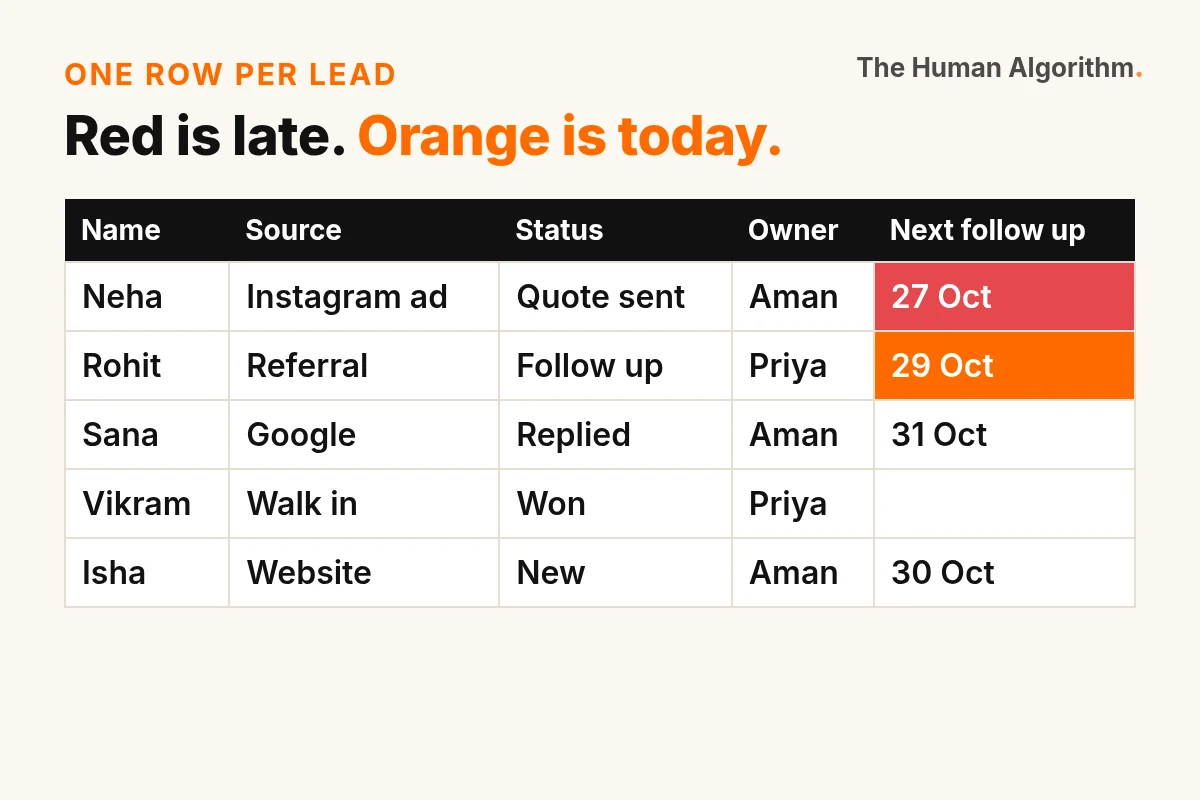
Use colour. Select the Next follow up column, go to Format, then Conditional formatting, and add a rule: if the date is before today, fill the cell red. Add a second rule: if the date is today, fill it orange.
Now the sheet tells you what to do. Red rows are late. Orange rows are due today. Open the sheet, filter by your name, and work the red and orange rows.
What does the 10 minute daily routine look like?
Every morning, before WhatsApp takes over the day:
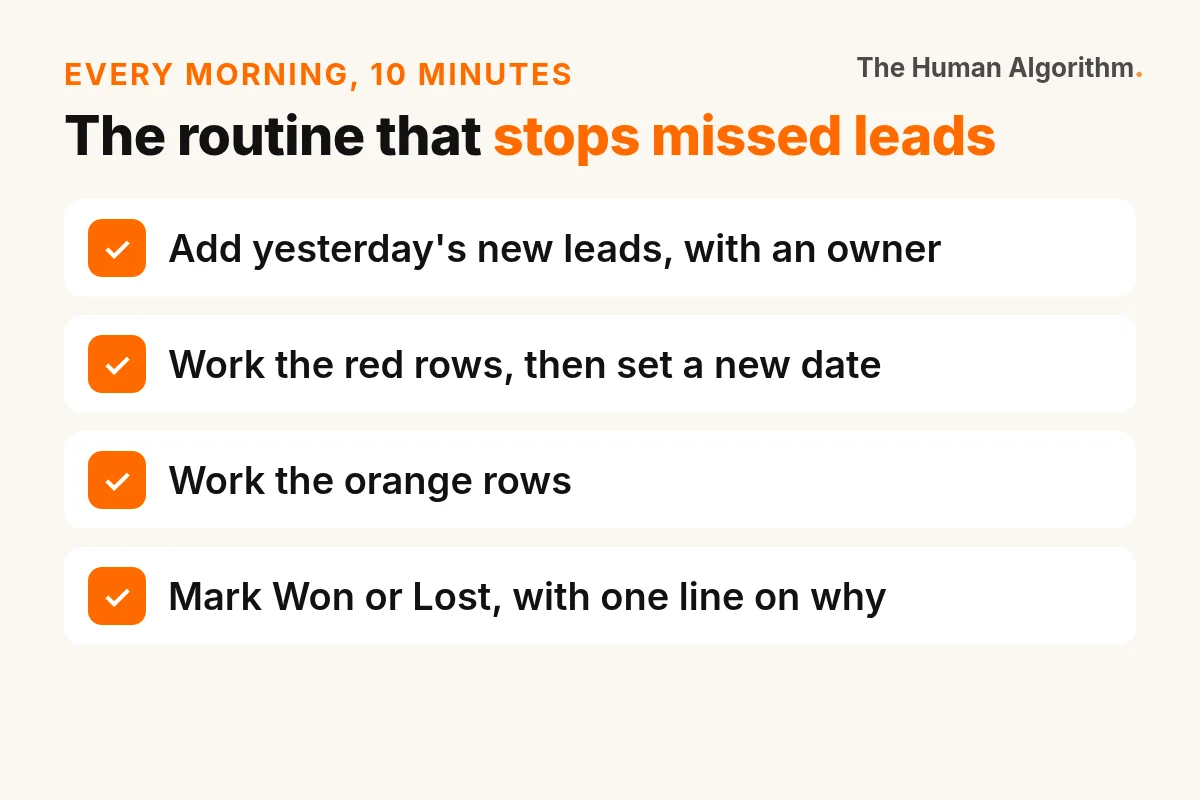
- Add yesterday's new leads. One row each. Fill Source and Owner.
- Work the red rows. Send the follow up or call. Update Status and set a new Next follow up date.
- Work the orange rows. Same.
- Close what is closed. Mark Won or Lost, and write one line on why if it was lost.
That last step is gold. After a month, the Lost reasons tell you what to fix. "Price too high" ten times means your page or your offer needs work. "No reply after quote" means your follow up needs work. My guide on quote sent, then silence helps with that one.
What numbers should you check every week?
Three simple counts, using a filter or a COUNTIF formula.
- Leads by source. Which channel brings the most leads?
- Won by source. Which channel brings the most sales? This is often different.
- Leads with no follow up date. This should be zero.
When you know which source brings sales, you know where to spend. And when you can count leads in and replies out, you can see what slips through. I worked out what that slip costs in how much a missed lead really costs.
When is a Google Sheet no longer enough?
Some signs it is time to move up:
- More than one person edits at the same time all day and rows get overwritten.
- You get more leads a day than your team can type in.
- You need reminders that go out on their own, beyond a red cell.
Even then, the habit you built with the sheet is the hard part. The tool is easy to change.
What should you do this week?
- Make the sheet with the 9 columns.
- Add the dropdowns and the red and orange colour rules.
- Put every open lead from your WhatsApp into it, with an owner and a next date.
If you want a team that replies, follows up and keeps this sheet updated for you, that is what our Revenue Desk does, with a 9 AM report every day.
Questions people ask
How do I track leads in Google Sheets?
Use one row per lead with columns for date, name, phone, source, interest, status, owner, next follow up date and notes. Add dropdowns for status, source and owner, and colour overdue follow up dates red. Check the red rows every morning.
What columns should a lead tracking sheet have?
At minimum: date, name, phone, source, interest, status, owner, next follow up date and notes. Owner and next follow up date matter most, because a lead without an owner or a date usually gets forgotten.
Is Google Sheets enough for a small business CRM?
For a team of 1 to 5 people with a manageable number of leads, yes, if everyone uses it daily. Move to a CRM or a desk when several people edit all day, leads arrive faster than you can type them, or you need reminders that go out on their own.
THA Circle
Use AI. Still sound human.
A free WhatsApp channel for founders, coaches and creators who want AI to save time without losing the human touch.
- On joining A welcome pack: 3 AI prompts and 5 chat scripts you can copy today.
- Monday A short script for your own chats. Ten minutes to try.
- Wednesday One real chat taken apart, names removed.
- Friday Human of the Week. A moment a customer felt seen.
Free. Takes ten seconds. Channel followers stay private. Leave any time.
The Sunday note
How people pay attention, and how to earn it. One email a week.
I study AI, attention, human psychology and marketing. Every Sunday I send one idea and one script for your chats. Five minutes to read. Reply any time, I read every answer.
Get the Sunday noteFree. Leave any time. Your email stays private.
 Sent the payment link, then nothing?
 What does a missed lead really cost?
 Follow ups that do not feel pushy